What Does an AI Video Actually Cost?
AI video tools are everywhere right now, and the demos look incredible. Cinematic clips, flowing landscapes, lifelike movement — all generated from a text prompt in seconds. For small business owners who've been cobbling together content on a phone and a shoestring, it sounds like a game-changer.
But before you sign up, there's a question worth asking: what does one video actually cost?
The answer is more complicated — and more expensive — than most platforms make it look. Here's the honest breakdown.
The Two Workflows: Know Which One You Actually Need
Short-form video creation has split into two very different approaches for small businesses, with very different price tags.
Workflow 1 — Edit what you film on your phone
Tools like CapCut, Canva Video, and Descript take footage you've already captured and help you cut, caption, add music, and polish it for social. Most of this is free or very cheap. A beginner can produce a polished 15–30 second reel in CapCut in about 30 minutes, at zero marginal cost per video.
Workflow 2 — Generate a video from a text prompt or blog post
Tools like Higgsfield AI, Pictory, and HeyGen use heavy AI to create video clips from scratch — no filming required. This is the exciting demo territory. It's also where credit systems, expiry windows, and unpredictable costs live.
Most small businesses think they need Workflow 2. Most of them actually need Workflow 1. That distinction alone will save you a lot of money and frustration.
The Real Cost by Tool Category
Honest snapshot of the main tools for 15–30 second social reels (USD, mid-2026):
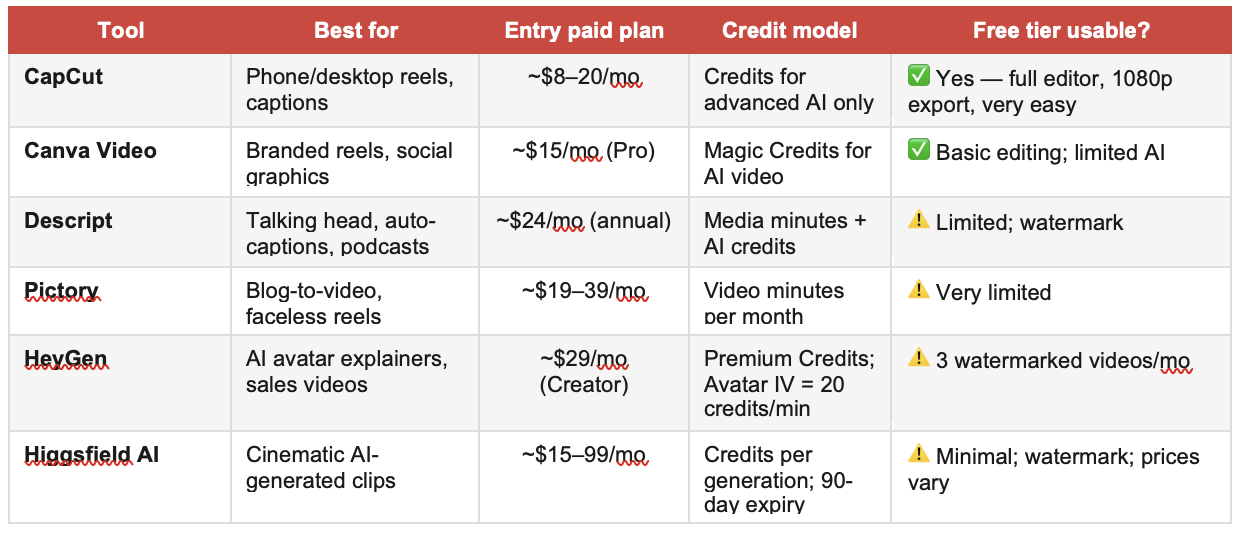
Note: All platforms update pricing regularly — always confirm at their website before purchasing.
The Zero-Cost Stack Most Small Businesses Don't Know They Have
For the majority of small businesses making 15–30 second reels, the cheapest and most effective workflow looks like this:
• Script: Use Claude or ChatGPT to write a hook, 3 key points, and a CTA. Cost: your existing AI subscription — not per reel.
• Film: 60 seconds on your phone. Vertical. Natural light. That's it.
• Edit: Open CapCut (free). Add auto-captions, trim, and insert royalty-free music. Export at 1080p. Done.
Total cost per reel: $0. This isn't a workaround. It's a legitimate production workflow that consistently outperforms AI-generated video in engagement for most small business categories — because it's real, recognisable, and human.
The Higgsfield Credit System: A Case Study in Hidden Costs
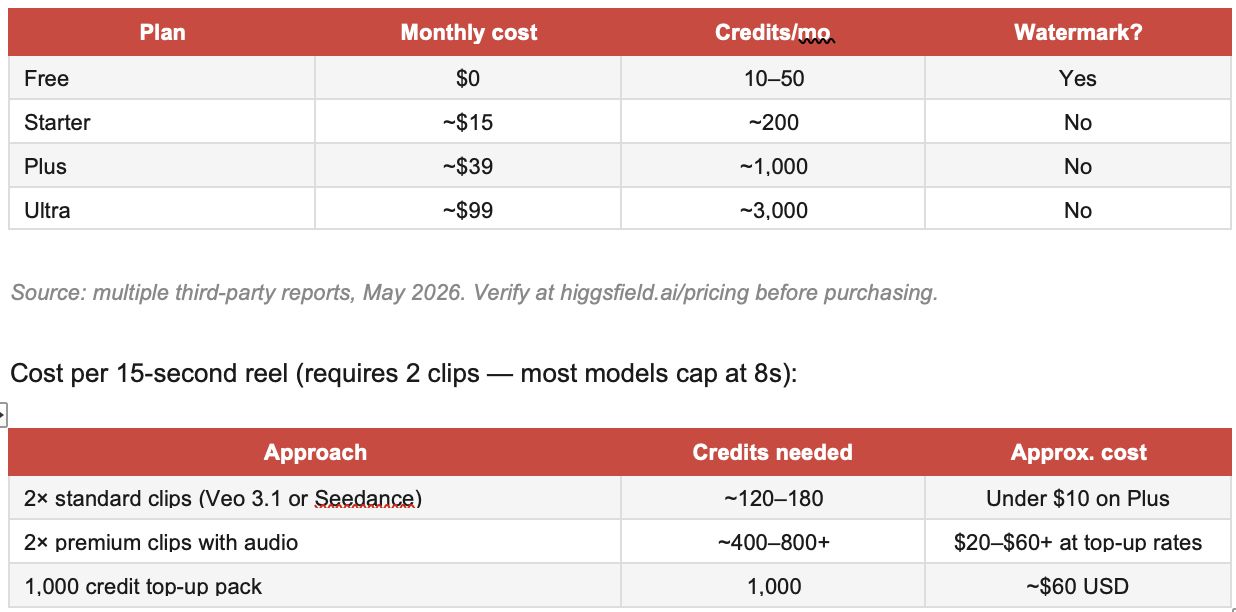
Higgsfield AI is one of the more capable cinematic video generators available right now — and a perfect illustration of how credit systems create unpredictable costs. Pricing has been restructured multiple times in 2025–2026, and third-party review sites often disagree by a factor of two.
Reported plans as of mid-2026 (annual billing):
The Credit Traps to Watch Out For
• Expiry is real. Credits disappear after 90 days — including subscription and top-up credits. Don't bulk buy without a clear plan to use them.
• Failed generations still cost you. A useless clip costs the same as a great one. Budget 2–3× what you think you'll need for your first project.
• Pricing pages are inconsistent. Don't trust third-party reviews for pricing — go directly to the platform's pricing page before you commit.
• Geographic restrictions apply. Seedance 2.0 is not available in the US or Japan.
• Hidden AI costs in tools you already use. Canva Magic Video, CapCut AI generation, and Descript AI features all consume credits from monthly allowances you may not realise are capped.
When AI Video Is Worth It — and When Your Phone Wins
Your phone + CapCut wins when:
• You're selling something people connect with through authenticity — food, pets, people, local experiences
• You're on TikTok, where real and raw consistently outperforms polished
• You're making 1–3 reels a week — a phone workflow takes less time than learning credit-based tools
• The AI video cost exceeds what you'd spend on 30 minutes of your own time filming
AI video generation earns its place when:
• Your product is hard to film (concepts, invisible services, aspirational lifestyle)
• You're repurposing high-volume written content at scale (Pictory's sweet spot)
• You need polished presenter videos without a camera setup (HeyGen's sweet spot)
• Cinematic brand aesthetics are a genuine business asset, not just a nice-to-have
Authentic footage of your actual business, edited in CapCut with a good audio track, consistently outperforms AI-generated content for most small business categories. The algorithm rewards watch time and saves, not production value.
Your Recommended Stack by Use Case
"I just want to post reels a few times a week"
→ CapCut Free + your phone. Use Claude/ChatGPT for the script. Cost: $0 per reel.
"I already use Canva for everything"
→ Canva Pro (~$15/mo). Video editing, brand kits, stock footage, and some AI video as a bonus. Cost per reel stays near $0 unless you're heavily using Magic Video AI.
"I write a lot and want to repurpose it as video"
→ Pictory Starter (~$19–25/mo). Paste a blog post, get a video. Typically 30 short videos within the included minute allowance.
"I need professional explainer videos without being on camera"
→ HeyGen Creator (~$29/mo) for high-value, reusable assets only. Budget your ~10 avatar-minutes per month carefully.
"My brand needs cinematic AI-generated visuals"
→ Higgsfield or similar. Start on the free tier, test your use case, then choose the smallest plan that meets your volume. Factor in iteration costs.
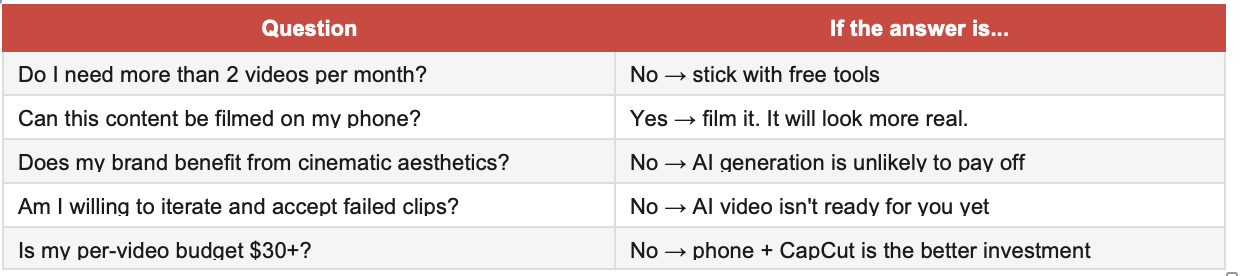
5 Questions Before You Spend Anything
Where to Start if You Want to Experiment
• Start with CapCut Free and your phone. Establish a baseline before spending on anything.
• Test any AI tool on the free tier. Watermarks are fine for testing — check quality first.
• Buy the smallest credit pack available, not the largest. The 90-day expiry makes bulk buying risky.
• Compare AI clips to phone-filmed versions. Let your audience engagement data decide.
• Watch for hidden credit caps in tools you already use — Canva Magic Video, CapCut AI, and Descript AI all have monthly limits.
The tools are improving fast, and costs are coming down. But for most small businesses right now, phone + CapCut is still the most cost-effective setup. AI generation earns its place for specific use cases — not as a blanket replacement for real footage.