In short: yes. On 23 October I sat through a live Claude workshop where the presenter built a scored, branded, 20-question quiz with no code, no designer and no developer, in roughly an hour of Claude’s time. The order of the steps matters more than the tools. And there is one catch about sharing it with customers that the workshop skipped, so read to the end before you start.
Key takeaways
• A lead tool is a quiz, calculator or scorecard that gives a visitor a useful answer in exchange for their details. It beats a brochure because it starts a conversation.
• The workshop recipe has five steps: ask, research, brand it, build, publish. Claude does most of the work in steps two to five.
• Claude Design is available on every Claude plan, including Free. Claude’s Research feature and scheduled tasks are paid-plan features.
• As at 24 October 2026, Anthropic’s help centre says people need a Claude account to open a shared artefact. For a customer-facing tool, export the HTML and put it on your own website instead.
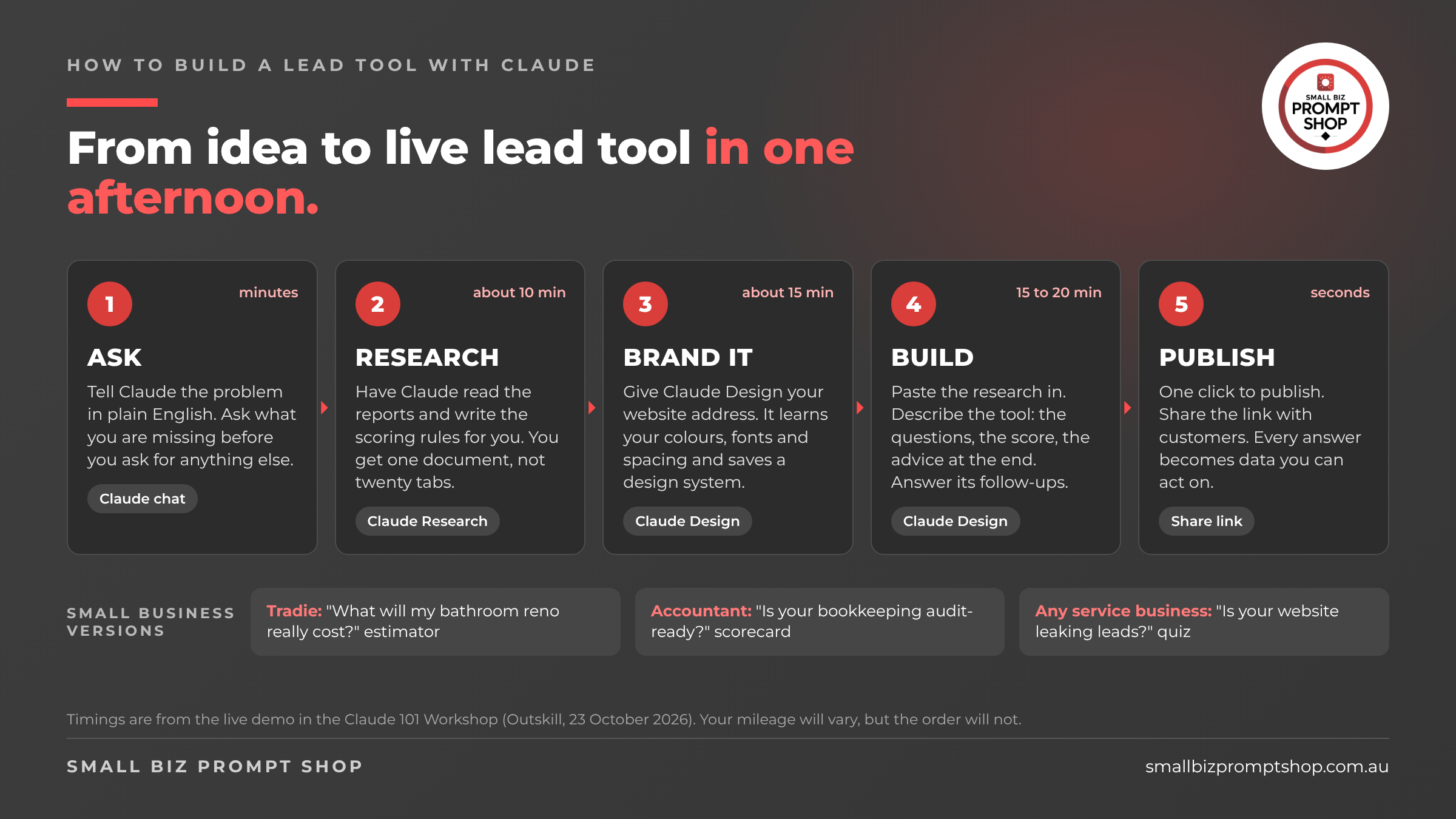
• There are four ways to hand work to Claude: a prompt, a skill, a workflow and a scheduled task. Most small business owners never leave the first one.
What is a lead tool, and why would a small business want one?
A lead tool is a small interactive thing on your website that does a job for the visitor. A quiz that tells a tradie’s customer roughly what their bathroom reno will cost. A scorecard that tells a cafe owner whether their Google profile is working. A calculator that tells a landlord what a vacant week costs them.
The visitor gets an answer they wanted. You get their email, their answers and a reason to follow up that is about them, not about you. That is why we build lead tools for small businesses instead of brochures. A brochure says “here is what we do”. A lead tool says “here is where you stand”. Only one of those starts a conversation.
Until recently, building one meant a developer, a designer, or a wrestle with a quiz plugin that looked like everyone else’s quiz plugin. That is the bit that has changed.
What did the workshop actually build?
The Claude 101 Workshop was run by Outskill on 23 October 2026. A fair chunk of it was a pitch for their paid course, which I will leave to them. The useful part was the live build.
The presenter played a fictional staffer, Phoebe, who had been told to get her company’s employees using AI properly. Her idea: an AI readiness calculator. Twenty questions, a score out of 100, a comparison with the big published AI readiness reports, and advice on what to do next.
Swap “employees” for “customers” and “AI readiness” for whatever your customers are secretly worried about, and you have a lead tool. The recipe is the same.
How do you build a lead tool with Claude Design?
Here is the five-step workflow, as demonstrated, with my notes on how a small business would do each step.
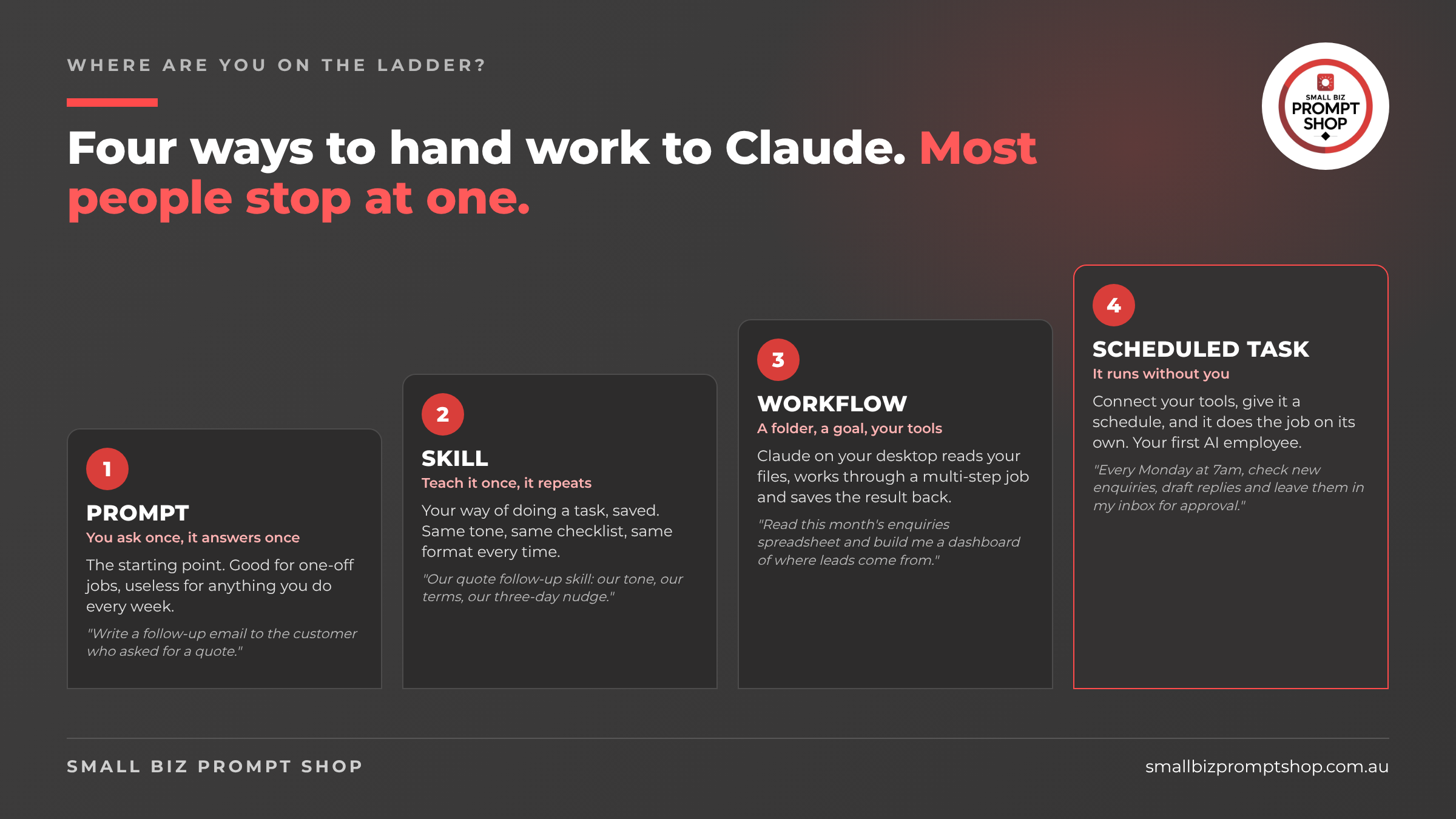
Five-step workflow for building a lead tool with Claude: ask, research, brand it, build, publish, with small business examples for a tradie, an accountant and a service business.
Image file: sbps_claude101_lead_tool_workflow_16x9.png. Alt text: Five-step workflow for building a lead tool with Claude: ask, research, brand it, build, publish, with small business examples for a tradie, an accountant and a service business.
Step 1. Ask Claude how to solve it before you ask it to solve it. The presenter’s first prompt was not “build me a quiz”. It was closer to “I want to build a readiness calculator. Employees answer a short set of questions and get scored against published benchmarks. How should I go about this, and which reports should I use for the scoring?” Then a second question I have started using on everything: “Do you think I am thinking about this the right way, or am I missing something?” Claude came back with an approach and a reading list. Ten minutes of thinking saved him a week of wandering.
Step 2. Have Claude do the reading. Nobody has time to read eight industry reports. He asked Claude to write him a research prompt, then ran it in Claude’s Research feature. In the demo it ran for about nine minutes, cited around 250 sources and produced one document with a scoring rubric in it. For a small business, the reading list is different but the move is identical. A bookkeeper’s “is your bookkeeping audit-ready” scorecard would start with the ATO’s record-keeping pages. A plumber’s reno estimator would start with the cost guides your industry body already publishes. Research is a paid-plan feature, so on the Free plan you would do this step in a normal chat with web search on.
Step 3. Teach Claude your brand first. This is the step most people skip, and it is why most AI-built things look like AI-built things. Claude Design has a design systems feature: a saved description of your colours, fonts, spacing and logo that every future design picks up automatically. In the demo he gave Claude the company website address and told it to learn the brand from it, and it took about 15 minutes. Anthropic’s own guide lists logos, fonts, slide decks, PDFs and screenshots as the inputs, so if the URL route does not work for you, upload your logo and a screenshot of your homepage. I made a short video on building a free brand design system in Claude if you want to see it done.
What is an AI employee actually made of?
The presenter called the top rung an AI employee and said he runs 25 to 30 of them. That is his claim, not something I can verify, and you do not need 30. You need one, built properly. Here is what one is made of.
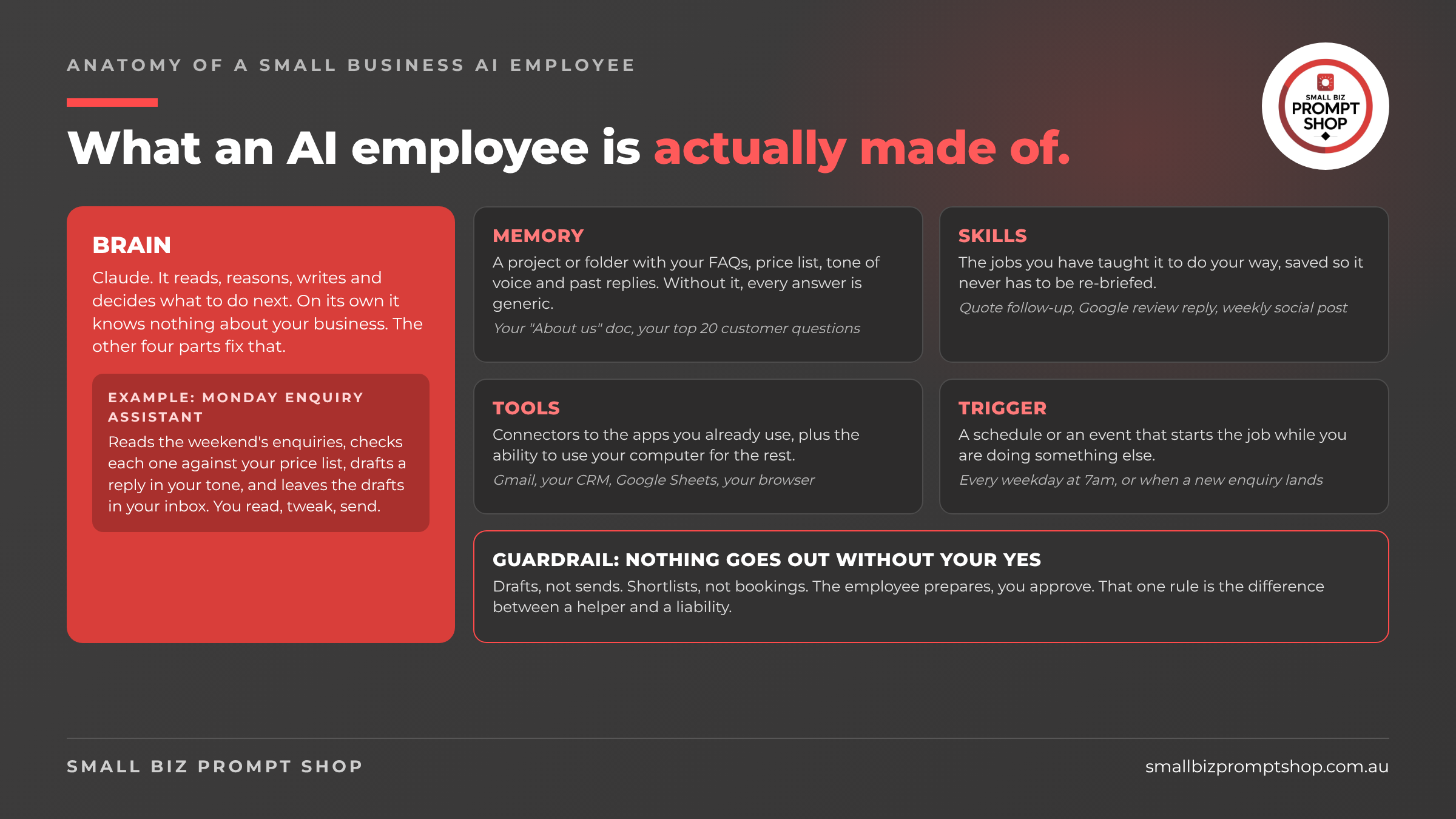
Anatomy of a small business AI employee: brain, memory, skills, tools, trigger, and a guardrail that nothing goes out without your approval.
Image file: sbps_claude101_ai_employee_anatomy_16x9.png. Alt text: Anatomy of a small business AI employee: brain, memory, skills, tools, trigger, and a guardrail that nothing goes out without your approval.
The brain is Claude. On its own it knows nothing about your business. The memory is a project or folder with your FAQs, price list and tone of voice. The skills are the jobs you have taught it. The tools are connectors to your email, your CRM, your spreadsheets. The trigger is the schedule.
And the guardrail, which the workshop did not have, is this: nothing goes out without your yes. Drafts, not sends. Shortlists, not bookings. Anthropic’s own Cowork guide says the feature “has unique risks due to its agentic nature and internet access” and describes a permission setting it recommends only “when you completely trust every action, connector, file, app, etc. involved in the task”. Read that as: start in manual mode and stay there until you have watched it work for a month.
Should you build one?
If you are still on rung one, do not start with an AI employee. Start with the lead tool. It is a contained project, it produces something customers can see, and every step teaches you a feature you will use again: Research, design systems, Claude Design, publishing.
If you already have a lead tool, the next move is the Monday morning enquiry assistant on the anatomy diagram. Build it as a workflow first, with you pressing the button. Schedule it only when the drafts come out right four weeks running.
FAQ
Do I need a paid Claude plan to build a lead tool with Claude Design? No. Claude Design is available on the Free plan as well as Pro, Max, Team and Enterprise. You would need a paid plan for the Research feature used in step two, and for Cowork and scheduled tasks on the desktop app.
Can my customers use the quiz if I just share the Claude link? Only if they have a Claude account. Anthropic’s help centre states that everyone needs a Claude account to open a shared artefact, with an exception for older published chat artefacts. For customers, export the standalone HTML and host it on your own website.
How long does it take to build a lead tool with Claude? In the workshop demo, research took about nine minutes, the design system about 15 minutes and the build 15 to 20 minutes, plus the presenter’s time writing prompts and answering Claude’s questions. Budget an afternoon for your first one and expect to iterate.
What is the difference between a skill and a scheduled task in Claude? A skill is a saved way of doing a task that Claude repeats whenever you ask. A scheduled task runs a job on its own at a set time, using your connected tools, and only while your computer is awake and the Claude desktop app is open.
Is an AI employee safe for a small business? It is as safe as the permissions you give it. Keep it in manual approval mode, have it produce drafts and shortlists rather than send or book anything, and review the output for a few weeks before you loosen anything.
Next step
If you want a lead tool but would rather not spend the afternoon, this is what we build for small businesses. If you want to learn to build the whole engine around it, with someone watching your screen, that is the Coached Engine Build. And if you are not sure which rung you are on, the AI quiz takes three minutes.